- Windows
- 2 min read
Our apps are now on Windows
EPUB Reader and File Viewer are in the Microsoft Store, with a document scanner and a screen recorder on the way. Same rules as our iPhone apps: one job each, no account, your files stay on your PC.
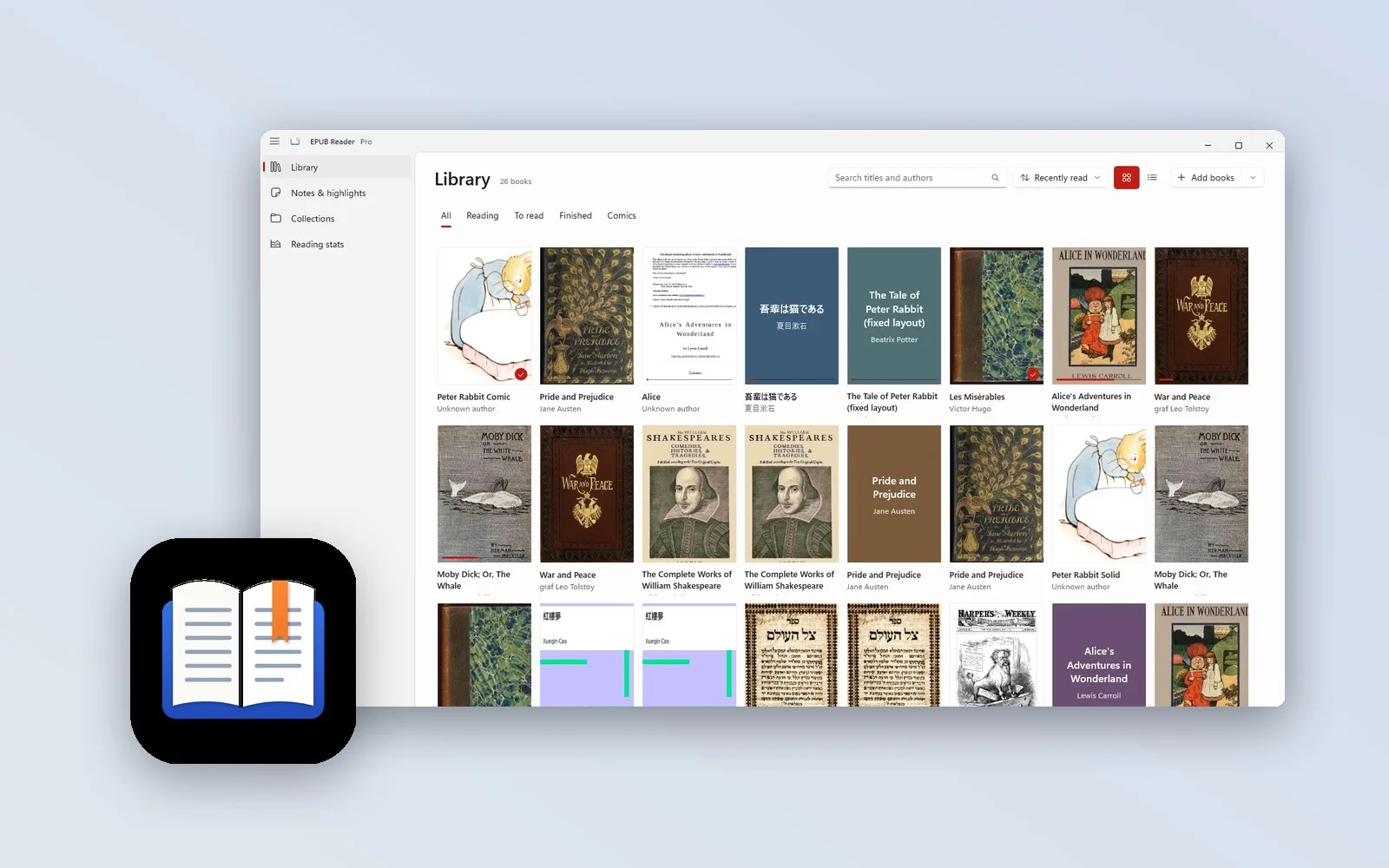
koykstudio makes Windows apps now as well as iPhone apps. Two are already in the Microsoft Store and two more are on the way. They follow the same rules as everything else we make: each does one job, none needs an account, and your files stay on your PC.
In the Microsoft Store now
EPUB Reader reads DRM-free eBooks and comics: EPUB, MOBI, AZW3, FB2, CBZ, CBR, CB7, TXT and PDF. Your library, highlights and notes are kept on the PC. It reads books from the folders you already keep them in and doesn’t copy or change the files. It doesn’t remove DRM, so books bought with DRM won’t open.
File Viewer opens the files Windows can’t: Word, Excel and PowerPoint documents without Office, iPhone HEIC and camera RAW photos, ZIP, RAR and 7Z archives, Outlook emails, AutoCAD drawings and more, each in its own tab.
Both are free to use with no ads and no account. Each has an optional Pro upgrade, bought once through the Microsoft Store.
Coming next
Scan to PDF turns paper into clean PDFs from your scanner or your PC’s camera. Screen Recorder records your screen and webcam, then lets you move, resize or hide your camera for any part of the video. Their pages are up already, with their privacy policies.
What’s different on a PC
A desktop app works with your files where they are, so there’s no import step and no second copy. Screenshots of a PC app are wide, which is why the Windows apps on this site get a wider gallery than the iPhone ones.
Purchases go through the Microsoft Store. Microsoft handles payment and refunds, the same way Apple does for our iPhone apps, and we never see your card or account details.
Questions people ask
Which versions of Windows do the apps run on?
Windows 11, and Windows 10 version 1809 or later (Screen Recorder needs version 2004 or later). Each app’s page lists it under Requires. Microsoft ended support for Windows 10 on October 14, 2025, so it recommends moving to Windows 11.
Where do I download them?
From the Microsoft Store. The page of each app that’s available has a “Download from the Microsoft Store” button.
Do the Windows apps send my files anywhere?
No. EPUB Reader and File Viewer don’t upload your files, and we don’t run a server for them. A few features go online only when you ask: EPUB Reader looks up a word in another language on Wiktionary, and File Viewer shows the pictures in an email only if you choose to load them. Each app’s privacy policy lists all of it.
From the studio
Apps in this article
-
 EPUB Reader: eBook & Comic Reader
Read eBooks and comics
-
 File Viewer
Open almost any file
-
 Scan to PDF: Document Scanner App & OCR
Scanner and camera to PDF
-
 Screen Recorder & Webcam Editor
Record, then move your webcam
Keep reading
All articles-
Guides
How to tell if a utility app respects your privacy
A keyboard, a scanner, a file viewer: small tools often ask for a lot. Five checks you can do in a few minutes before you install one, on iPhone or Windows.